
BP Simulator: Optimize Processes with Precision
Overview
The BP Simulator is a desktop application designed to support organizations in identifying performance bottlenecks, testing process improvements, and generating actionable performance indicators. It serves professionals in business process management, operations optimization, and lean manufacturing who need data-driven insights to enhance productivity and efficiency. The software enables users to model processes visually and simulate real-world operational dynamics, making it particularly useful for teams involved in product and service development, process reengineering, and ABC-costing initiatives.
By leveraging discrete-event simulation, the tool allows users to assess how changes in workflow, staffing, or resource allocation impact overall performance. The software supports import from industry-standard formats such as BPMN, EPC, and Visio, facilitating seamless integration with existing process documentation. This makes it a practical choice for teams already using these modeling tools. Real-world applications include evaluating production line efficiency, optimizing service delivery cycles, and measuring operational costs under different scenarios.
The developer did not provide additional background information. However, the software’s focus on simulation, process modeling, and cost analysis suggests it was developed with input from business analysts, operations managers, and process engineers. The inclusion of a cloud file storage feature indicates a growing emphasis on collaboration and accessibility.
Key Features & Capabilities
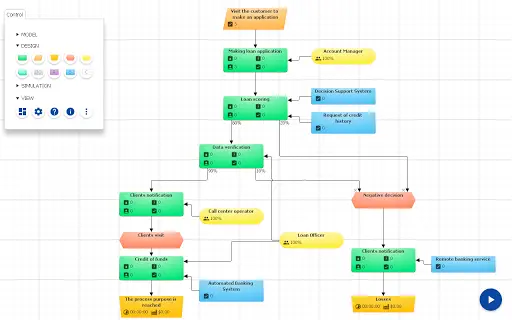
- Visual Model Mapping: Users can create intuitive, drag-and-drop process diagrams to represent workflows and operational sequences. This visual approach simplifies complex processes and improves team alignment during analysis.
- Import from BPMN, EPC, Visio: The software supports direct import of process models from widely used standards, enabling users to leverage existing documentation without manual re-entry.
- Discrete-Event Simulation: By simulating process execution over time, users can observe how delays, resource constraints, and variability affect throughput, cycle time, and efficiency.
- Productivity Dashboard: A centralized interface displays key performance metrics such as utilization rates, processing times, and bottleneck locations, helping users quickly identify areas for improvement.
- Responsibility Matrix: The tool allows users to assign roles and responsibilities within the process, supporting accountability and clarifying handoff points.
- Operating Time and Cost Calculation: Automated tracking of time and resource usage enables accurate cost estimation and supports ABC-costing practices.
- Cloud File Storage: Projects can be saved and accessed via cloud storage, promoting collaboration and version control across teams.
These capabilities are particularly effective in scenarios such as streamlining manufacturing workflows, improving customer service processes, or validating proposed changes before implementation. The integration of multiple modeling and analysis tools within a single environment enhances workflow efficiency and reduces the need for switching between applications.
User Interface, Workflow & Performance
The user interface is structured around a central workspace for process modeling, with side panels for tool selection, model properties, and simulation controls. Navigation is intuitive, with clearly labeled menus and context-sensitive options. Users can create, edit, and simulate models using a combination of drag-and-drop interactions and property configuration.
Workflow efficiency is enhanced by the ability to import existing process diagrams and immediately begin simulation, reducing setup time. The tool supports iterative testing, allowing users to adjust parameters and observe outcomes in real time. This supports rapid prototyping of process improvements.
The developer did not specify resource usage details. Performance observations are based on general software behavior patterns. Stability during extended simulation runs has not been publicly documented. Users should expect standard desktop application behavior in terms of CPU and RAM usage, with performance dependent on model complexity and system configuration.
Compatibility & System Requirements
BP Simulator is available for both Windows and Mac operating systems. The software version is 2.0.2, with a file size of 100 MB. The developer did not specify exact system requirements, including minimum CPU, RAM, or disk space needs. Compatibility information was partially provided.
Installation is straightforward, and the software is designed to run on standard desktop environments. Users are advised to ensure their system meets general requirements for running modern desktop applications. For optimal performance, a stable internet connection is recommended for accessing cloud file storage features.
Pros and Cons
Pros
- Supports import from BPMN, EPC, and Visio for seamless workflow integration.
- Includes discrete-event simulation for realistic performance analysis.
- Offers a productivity dashboard with real-time performance indicators.
- Enables cost and time calculation for process optimization and ABC-costing.
- Cloud file storage enhances collaboration and project accessibility.
- Free to download and use, making it accessible for teams of all sizes.
Cons
- Exact system requirements were not listed, which may affect installation planning.
- Performance under heavy load or complex models was not specified.
- Advanced features may require a learning curve for new users.
- Cloud storage functionality depends on stable internet access.
- No public information on update frequency or long-term development roadmap.
FAQ Section
Is BP Simulator compatible with Windows and Mac?
Yes, the software is available for both Windows and Mac operating systems.
Is the software free to use?
Yes, BP Simulator is currently offered at no cost.
Can I import my existing process models?
Yes, the software supports direct import from BPMN, EPC, and Visio formats.
Does BP Simulator require an internet connection?
While the core application can run offline, cloud file storage requires a stable internet connection.
What kind of support is available?
Users can access the Reference Guide at https://www.bpsimulator.com/en/help or contact [email protected] for assistance.
Final Thoughts + CTA
BP Simulator stands out as a powerful tool for professionals seeking to improve operational efficiency through simulation and data-driven decision-making. Its ability to import industry-standard models, simulate real-world processes, and generate detailed performance metrics makes it a valuable asset for business analysts, operations managers, and process engineers. The inclusion of cost and time calculations, along with a cloud-based storage system, enhances its practicality for collaborative environments.
While some technical details such as system requirements and performance under load are not publicly available, the software’s core functionality is robust and well-aligned with real-world business needs. Its free availability further increases its appeal, especially for small teams or educational institutions exploring process optimization.
For organizations aiming to refine their workflows, reduce waste, and improve productivity, BP Simulator offers a compelling solution. Download BP Simulator now.







